Add Referring Group
Add Referring Group
Sonographers have the ability to add new Referring Groups directly from the study worksheet.
- Open the study worksheet
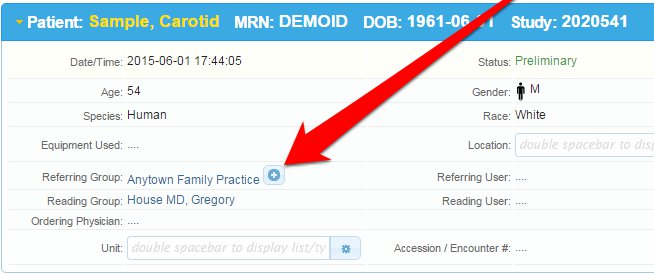
- In the Patient area click on the + icon in the Referring Group area
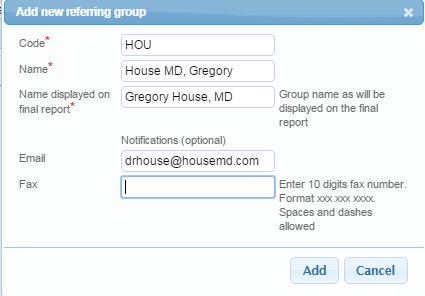
- Fill in the Referring physicians information, including an appropriate 3-4 letter code for the doctor, and the email address or fax number if they would like their final reports automatically delivered on approval.
Administrators can also add/edit Referring Groups from the Admin tab. See detailed information in Studycast Help
Related Articles
Add Users to a Group
To add users to a division, reading group, or referring group, In the main menu, click Admin. In the menu on the left, select Users. Find the user you want to add to a group and click the edit icon in the ID column. Select the Group settings tab. For ...Add Division
Adding Divisions Divisions are an optional way to organize workflows and to define which studies admins, technologists/sonographers, and office staff can access. Divisions do not define which studies reading or referring physicians can access. Their ...Add Client Logo to Study Reports
Studycast study reports can be customized to include a logo image. A single logo can be used for all study reports, or you can use different logos for different divisions, reading groups, or referring groups. If 'Study report logo source = None' ...Add Address to Study Report Header
Studycast provides users with the option to automatically populate report headers based on the address information entered in Contact info. The same address information can be used for all study reports, or you can use different addresses for ...Add a Cine Frame to a Study
Add a Cine Frame to a Study To add a frame from a cine loop to a study as a still image: Pause the cine loop using the Pause button at the bottom of the Study Viewer. Use the controls to step forward or backward to get to the frame you want to add. ...